
API v1
the studio flow, from your customers' own software.
A small REST API under /api/v1: bring a video in from a link, analyse it, list the suggested clips, render one, fetch the files. A key works in one workspace, with what that workspace's plan and credits allow.
01Switch it on
- Operator Console, System, Public API: "Public API and webhooks" on. Off, every key is refused and no webhook is sent, whatever the plan says. "Requests per minute per API key" is 60 by default (5 to 6000).
- Plan On the Plans page give the right plans "REST API and webhooks".
- Customer A workspace owner opens Developers in the app and creates a key. It is shown once and stored only as a hash. A workspace can have 20 keys; a key can be revoked at any time.
02Basics
| Thing | Value |
|---|---|
| Base address | https://your-domain/api/v1 |
| Authentication | Header Authorization: Bearer vdm_… |
| Bodies and answers | JSON, snake_case fields, ISO 8601 dates |
| Body size | Up to 1.5 MB of JSON; larger answers 413 |
| Errors | An HTTP status and {"error": "a sentence", "status": 402} |
| Rate limit | Per key and minute; over it: 429 with Retry-After: 60 |
export API=https://clips.your-agency.com/api/v1
export API_KEY=vdm_your_key

curl $API/workspace -H "Authorization: Bearer $API_KEY"
The answer has the workspace's id and name, its credits, and its plan with the plan's limits.
| Status | Meaning |
|---|---|
400 | The body is not valid JSON |
401 | No key, or the key is not valid or was revoked |
402 | The plan does not include the API, a plan limit is reached, or the credits are short |
403 | The API is turned off on the server, or a feature (such as import from a link) is switched off |
404 | Not found, or it belongs to another workspace |
409 | Wrong state, for example analysing a source that is still importing |
413 | The request body is larger than 1.5 MB |
422 | Invalid input; the sentence says what |
429 | Slow down, or too many things are waiting for this workspace |
03Endpoints
From src/server/routes/api-public.ts. The app's Developers page shows the same list, with copyable examples for the workspace's own address.
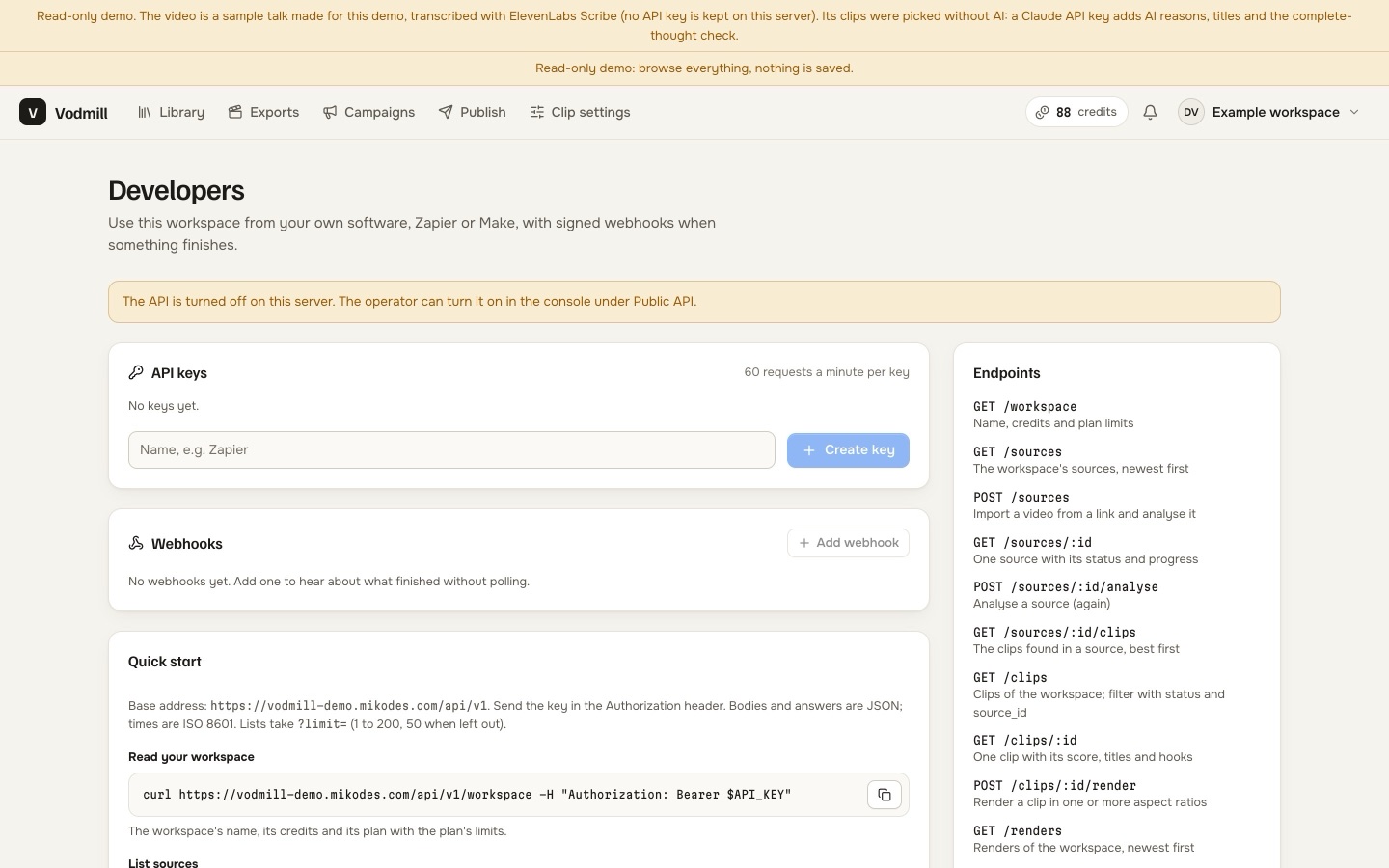
| Method and path | Body | Answer |
|---|---|---|
GET /workspace | { id, name, credits, plan: { name, limits } } | |
GET /sources?limit= | { sources: [source] }, newest first (limit 1 to 200, default 50) | |
POST /sources | { url, rights: true, title?, analyse?, options? } | 201 { source }. Brings a video in from a link. |
GET /sources/:id | { source } with status, step, progress and the number of clips | |
POST /sources/:id/analyse | { options? } | 202 { source, credits }. Charges the workspace. |
GET /sources/:id/clips | { clips: [clip] }, best score first | |
GET /clips?status=&source_id=&limit= | { clips: [clip] }; status is suggested, approved or rejected | |
GET /clips/:id | { clip } | |
POST /clips/:id/render | { aspects? }, any of "9:16", "1:1", "4:5", "16:9" | 202 { render, credits, eta_seconds }. Default: the clip's own aspect ratio. |
GET /renders?limit= | { renders: [render] } | |
GET /renders/:id | { render }; when done, files with signed links | |
GET /files/:render/<name>?exp=&sig= | The file. No key needed: the link is signed and works for one hour. |
POST /sources takes a link, so it needs import from a link switched on by the operator and included in the plan (Imports; YouTube, Twitch and Kick links also need the operator's yt-dlp, a direct link to a video file does not), and "rights": true: the statement that the user owns the content or has the owner's permission to clip it. Without it the answer is 422. File uploads are made in the app; a source uploaded there can be analysed and rendered through the API.
04Objects
From src/server/public-views.ts.
// source
{ "id": "…", "title": "…", "platform": "youtube", "url": "https://…", "creator": "…",
  "status": "importing | uploaded | queued | processing | ready | failed",
  "step": "transcribe", "progress": 0.42, "error": null,
  "duration_seconds": 3541.2, "width": 1920, "height": 1080, "language": "en",
  "credits": 118, "clips": 10, "created_at": "…", "finished_at": "…" }

// clip
{ "id": "…", "source_id": "…", "title": "…", "status": "suggested | approved | rejected",
  "start_seconds": 612.4, "end_seconds": 655.1, "duration_seconds": 41.3,
  "score": 84, "why": "…", "emotion": "insight",
  "hooks": ["…"], "titles": ["…"], "hashtags": ["…"],
  "flags": [{ "kind": "ends-before-payoff", "note": "…" }],
  "aspect": "9:16", "created_at": "…", "updated_at": "…" }

// render
{ "id": "…", "clip_id": "…", "source_id": "…", "title": "…",
  "status": "queued | running | done | failed | canceled | expired",
  "step": "Rendering", "progress": 0.6, "error": null,
  "aspects": ["9:16"], "credits": 2, "duration_seconds": 41.3,
  "queue_position": null, "starts_in_seconds": null,
  "files": [{ "name": "…", "kind": "…", "aspect": "9:16", "bytes": 12345678, "url": "https://…" }],
  "created_at": "…", "started_at": "…", "finished_at": "…" }
The values above are examples of the shape, not real data.
05A complete flow
# 1. bring a video in and analyse it as soon as it arrives
curl -X POST $API/sources -H "Authorization: Bearer $API_KEY" -H "Content-Type: application/json" \
  -d '{"url":"https://www.youtube.com/watch?v=VIDEO_ID","rights":true,"analyse":true,"options":{"count":8}}'

# 2. poll until "status" is "ready" (or use the source.ready webhook)
curl $API/sources/SOURCE_ID -H "Authorization: Bearer $API_KEY"

# 3. the suggested clips, best first
curl $API/sources/SOURCE_ID/clips -H "Authorization: Bearer $API_KEY"

# 4. render one in two shapes
curl -X POST $API/clips/CLIP_ID/render -H "Authorization: Bearer $API_KEY" -H "Content-Type: application/json" \
  -d '{"aspects":["9:16","1:1"]}'

# 5. poll until "status" is "done" (or use the clip.rendered webhook), then fetch files[].url
curl $API/renders/RENDER_ID -H "Authorization: Bearer $API_KEY"
options for an analysis: count, minLen, maxLen, genre, aspect, language, notes, cutSilence, zooms. Out-of-range values are corrected, not refused. Credits work as in the app: charged when the step is queued, returned when it fails or is canceled in the app.
Use only content the workspace owns or has permission to clip, through the API as in the app.
06What the API does not cover in 1.0.0
- Uploading a file, editing a clip, approving or rejecting clips.
- Campaigns and publishing.
- Console (operator) functions.
A key acts with the editor role in its workspace, on behalf of the person who created it.